Keyboard Mappings
AExp offers two keyboard mappings. Select MEGA65 or Amiga in the on-screen menu under Keyboard. You can change modes while software is running: the next key press uses the new mapping; keys already held keep their old mapping until released.
| Mode | How it works | Best choice when |
|---|---|---|
| MEGA65 (default) | Types the character printed on the MEGA65 keycap | You want the simplest everyday typing |
| Amiga | Maps by physical position, like the keyboard in deft's British A600 layout | You know the Amiga layout, follow original Amiga instructions, or software expects Amiga key positions |
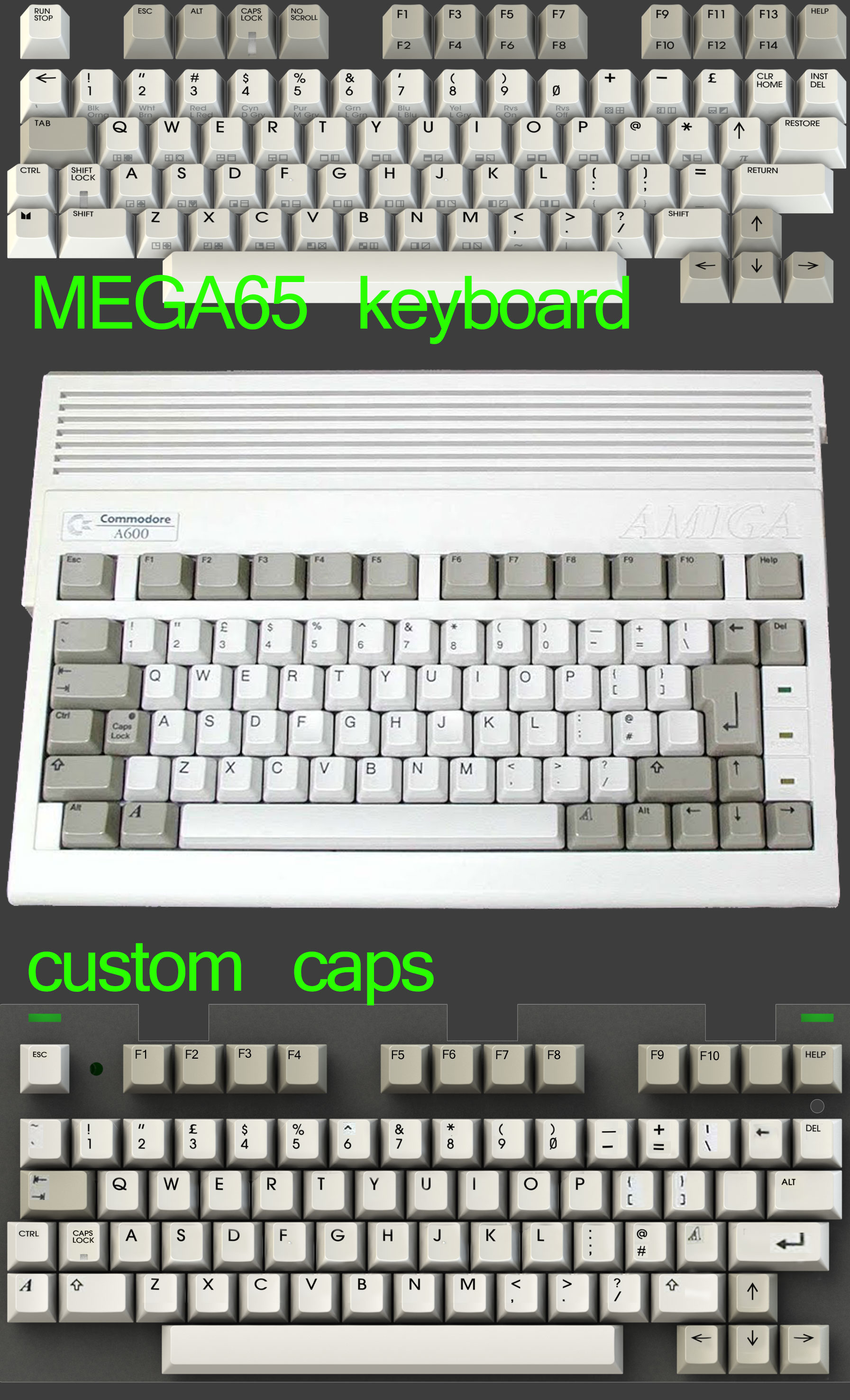
Start with MEGA65 mode. Switch to Amiga mode if a program needs the original layout. Some games, including Pinball Dreams, need Amiga mode because they do not work correctly with the MEGA65-mode function-key mapping.
MEGA65 mode (default)
The rule is simple: the cap is law. A key's main legend is typed directly, its upper legend with Shift, and its front-face legend with MEGA (the Commodore/C= key).
Letters and unshifted digits work as printed. The tables below contain the keys worth looking up.
Number row
| MEGA65 key | Without Shift | With Shift |
|---|---|---|
| 1 | 1 |
! |
| 2 | 2 |
" |
| 3 | 3 |
# |
| 4 | 4 |
$ |
| 5 | 5 |
% |
| 6 | 6 |
& |
| 7 | 7 |
' |
| 8 | 8 |
( |
| 9 | 9 |
) |
| 0 | 0 |
nothing (the shifted cap legend is not an Amiga character) |
Punctuation and symbols
| MEGA65 key | Key alone | With Shift | With MEGA |
|---|---|---|---|
| , | , |
< |
~ |
| . | . |
> |
| |
| / | / |
? |
\ |
| : | : |
[ |
{ |
| ; | ; |
] |
} |
| = | = |
_ |
_ |
| @ | @ |
nothing | @ |
| ← (top-left symbol key) | _ |
` |
` |
| ↑ (symbol key) | ^ |
nothing | nothing |
| * | * |
nothing | nothing |
The four nothing entries in the shifted column correspond to graphic-only
MEGA65 legends that have no printable Amiga character. In particular, the
Amiga character set has no printable left arrow or π.
The remaining useful symbol keys are:
| MEGA65 key | Amiga result |
|---|---|
| + | Keypad + |
| − | - |
| £ | \ on the default US Amiga keymap |
| INST/DEL | Backspace (delete left) |
| CLR/HOME | Delete (delete right) |
There are two ways to type a backslash: MEGA+/ or the
dedicated £ key. The latter produces \, not £, because the
default US Amiga keymap has no pound-sign key. Shift+£
produces | with that keymap.
MEGA still works as Left Amiga whenever it is not being used for a front-face symbol. This keeps Amiga shortcuts such as Left Amiga+N/M working. Tapping MEGA alone sends a normal Left Amiga tap.
Some printed characters require AExp to add or remove Amiga-side
Shift briefly. Normal Amiga software handles this correctly. A raw,
low-level keyboard diagnostic that bypasses keyboard.device may also display
those temporary modifier events.
Function, modifier, and control keys
| MEGA65 key | Amiga function |
|---|---|
| F1, F3, F5, F7, F9 | F1, F3, F5, F7, F9 |
| Shift + one of those F-keys | F2, F4, F6, F8, F10 |
| F11, F13 | No Amiga key; useful as clean menu keys |
| Help | Help |
| Esc | Esc |
| MEGA | Left Amiga, except while typing a front-face symbol |
| RESTORE | Right Amiga |
| Alt | Left Alt |
| No Scroll | Right Alt |
| Caps Lock | Amiga Caps Lock |
| Ctrl, Tab, both Shift keys, cursor keys | Same Amiga key |
| Run/Stop (hold) | Right mouse button |
| Ctrl+MEGA+RESTORE | Warm reset |
The reset combination is the Amiga's familiar Ctrl+Left Amiga+Right Amiga shortcut.
The MEGA65 has no numeric keypad or equivalent for the Amiga's international keys. Most keypad keys are therefore unavailable; + and * are the useful exceptions shown above.
Mouse from the keyboard
| Mouse action | MEGA65-mode keys |
|---|---|
| Move pointer | MEGA + cursor keys |
| Move faster | MEGA + Shift + cursor keys |
| Left button | MEGA + Alt |
| Right button | Hold Run/Stop |
Pointer movement and the left-button shortcut are features of the Amiga operating system. They work in Workbench and system-friendly applications, but not in games or demos that take over the machine. Tap a cursor key for fine movement or hold it to accelerate across the screen. The right-button shortcut is provided directly by AExp.
Amiga mode
Amiga mode is positional: each MEGA65 key sends the code of the key in the same physical position on an Amiga. The MEGA65 legends no longer determine the result, there is no MEGA symbol layer, and Shift passes through normally.
Most letters, digits, cursor keys, and the , . / cluster are already in the expected positions. The tables below show what changes. They assume the US keymap built into Kickstart 1.3.
Number row
| MEGA65 key | Key alone | With Shift |
|---|---|---|
| 1 | 1 |
! |
| 2 | 2 |
@ |
| 3 | 3 |
# |
| 4 | 4 |
$ |
| 5 | 5 |
% |
| 6 | 6 |
^ |
| 7 | 7 |
& |
| 8 | 8 |
* |
| 9 | 9 |
( |
| 0 | 0 |
) |
Punctuation by position
| MEGA65 keycap | Amiga key in that position | Key alone | With Shift |
|---|---|---|---|
| ← (top-left symbol key) | ` | ` |
~ |
| : | ; | ; |
: |
| @ | [ | [ |
{ |
| ; | ' | ' |
" |
| £ | \ | \ |
| |
| + | − | - |
_ |
| − | = | = |
+ |
| * | ] | ] |
} |
The reference layout is based on a British Amiga A600, while an Amiga booted directly with Kickstart 1.3 uses its built-in US keymap. The loaded Amiga keymap always has the final say: AExp sends key positions, not characters.
To reproduce the British reference exactly (including £ on
Shift+3 and @ on Shift+;), boot
Workbench and run SetMap gb. This requires DEVS:Keymaps/gb. A game or
demo that boots without Workbench remains on the US keymap. AExp cannot select
the Amiga keymap for the running software.
Function, modifier, and control keys
The entire MEGA65 top row maps positionally across the Amiga's Esc and F1–F10 row:
| MEGA65 key | Amiga key |
|---|---|
| Run/Stop | Esc |
| Esc | F1 |
| Alt | F2 |
| Caps Lock | F3 |
| No Scroll | F4 |
| F1 | F5 |
| F3 | F6 |
| F5 | F7 |
| F7 | F8 |
| F9 | F9 |
| F11 | F10 |
| Help | Help |
| F13 | Left Alt |
Every Amiga function key therefore has its own key; do not use Shift to select the even-numbered ones.
| MEGA65 key | Amiga function |
|---|---|
| MEGA | Left Amiga |
| = | Right Amiga |
| F13 | Left Alt |
| RESTORE | Right Alt |
| INST/DEL | Delete (delete right) |
| CLR/HOME | Backspace (delete left) |
| Shift Lock | Holds Left Shift |
| Ctrl, Tab, both Shift keys, cursor keys | Same Amiga key |
| ↑ (symbol key, hold) | Right mouse button |
| Ctrl+MEGA+RESTORE | Warm reset |
The left-arrow symbol shown on CLR/HOME in the reference layout is the Amiga's Backspace symbol: it means "delete left" and is not a printable left-arrow character.
The top-row Caps Lock acts as an ordinary momentary F3 key. Its LED still toggles because the MEGA65 keyboard controller owns the latch and LED; the light has no effect on the Amiga. A true Amiga Caps Lock is not available in this mode: the MEGA65 hardware combines the home-row Shift Lock and Left Shift signal, so Shift Lock can only hold Amiga Left Shift. It capitalizes letters but also shifts the number row. Use MEGA65 mode when you need genuine Amiga Caps Lock.
The MEGA65's shorter layout still has no numeric keypad or Amiga international keys in this mode.
Mouse from the keyboard
| Mouse action | Amiga-mode keys |
|---|---|
| Move pointer | MEGA + cursor keys |
| Move faster | MEGA + Shift + cursor keys |
| Left button | MEGA + F13 |
| Right button | Hold ↑ (the symbol key left of RESTORE, not a cursor key) |
Here MEGA is Left Amiga and F13 is Left Alt, so their combination is the Amiga operating system's built-in left-click shortcut. Pointer movement has the same Workbench-only caveat and acceleration behavior described for MEGA65 mode. AExp moves its direct right-button shortcut to the ↑ symbol key because Run/Stop is Esc in this mode.
Opening the menu and freeing the Help key
By default, Help opens and closes the AExp on-screen menu, as it does
in other MEGA65 cores. Help is also a real Amiga key. To reserve it for Amiga
software, open Keyboard > OSM: ("key to open the menu") and select a
different opener:
| Menu opener | In MEGA65 mode | In Amiga mode |
|---|---|---|
| Help (default) | Also sends Amiga Help | Also sends Amiga Help |
| F11 | Clean: sends nothing to the Amiga | Also sends F10 |
| F13 | Clean: sends nothing to the Amiga | Also sends Left Alt |
| MEGA+Run/Stop | Amiga sees Left Amiga and the right mouse button | Amiga sees Left Amiga+Esc |
Choosing an alternative leaves Help available solely to the Amiga. The selection is saved with the other settings and survives a restart.
In MEGA65 mode, F11 or F13 is the least intrusive choice because neither key has an Amiga mapping. In Amiga mode every choice also has an Amiga meaning, so choose the one least likely to disturb the software you are running. The two-key option is most likely to clash with a real Amiga shortcut or input.
The selected key also closes the menu; the MEGA+Run/Stop combination closes it symmetrically. While inside the menu, Run/Stop on its own steps back or closes it, so you cannot lock yourself out.