Color modes
The LCD screen of the original Game Boy Color hardware displayed rather washed out colors. Game developers back then knew this and chose their color palettes accordingly: A game that looks garish on a modern display may have looked exactly right on the real hardware.
This is why the on-screen-menu offers a "Color Mode" section with two modes:
-
LCD Emulation (default): A color grading is applied that approximates how the colors looked on the historical LCD screen. It is based on the well-known color-correction used by MiSTer. Because most games were designed with that screen in mind, this is the default.
-
Fully Saturated: The raw RGB values of the Game Boy Color are shown without any processing.
Comparison
The following screenshots from "Adventures of Elmo in Grouchland" show the difference: The yellow house turns orange/brown and Elmo turns from a clear red into a ruby tone.
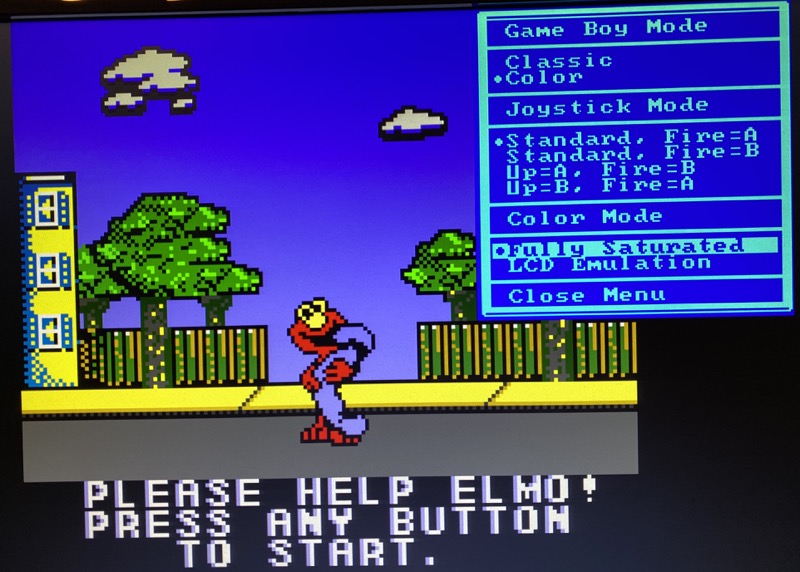
Fully Saturated: raw RGB colors
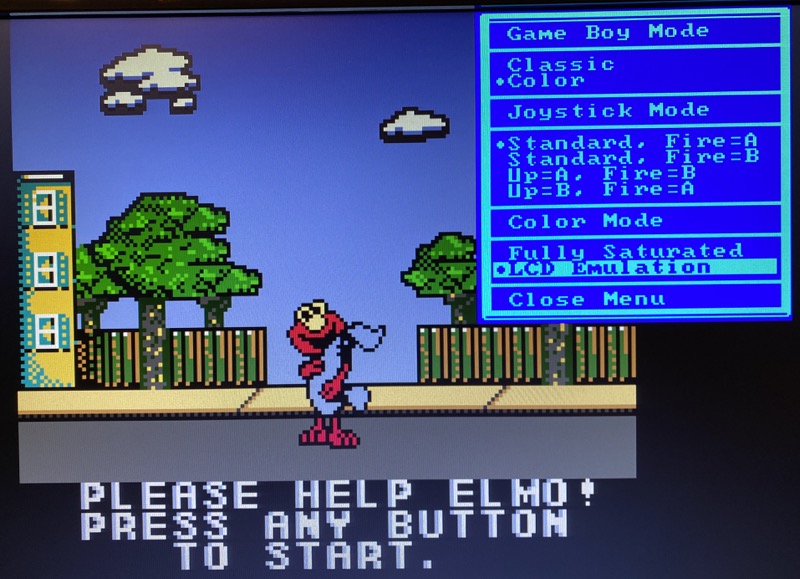
LCD Emulation: color grading approximating the historical LCD
Game Boy Classic
The color modes only affect Game Boy Color games: In Game Boy Classic mode, the core always renders the authentic 4-shade grayscale.
Learn more
If you want to dive deeper into the topic of color emulation, read this article about color emulation.