Joystick usage and mapping
Playing with a joystick is as simple as it gets: Plug your joystick into port #1 or port #2 of the MEGA65. Both ports work in parallel, so you do not need to remember which one is the "right" one. The joysticks even stay active while the on-screen-menu is open: the game keeps running and remains playable while you adjust settings.
The joystick's directions are mapped to the Game Boy's d-pad and the fire button is mapped to the Game Boy's A button by default. This default mode is called "Standard, Fire=A" and it works fine for many games.
Choosing a mapping mode
The Game Boy has two action buttons, A and B, and different games use them
differently. This is why the on-screen-menu (press Help to open
it) offers a "Joystick:
| Joystick Mode | Fire button | Joystick up |
|---|---|---|
| Standard, Fire=A | A | d-pad up |
| Standard, Fire=B | B | d-pad up |
| Up=A, Fire=B | B | A and d-pad up |
| Up=B, Fire=A | A | B and d-pad up |
The two "Up" modes deserve an explanation: Games like Super Mario Land and Castlevania use the A button to jump. With the mode "Up=A, Fire=B" you jump by moving the joystick up - exactly how jumping feels natural on a classic home computer - while the fire button is used for the action mapped to B (such as attacking with the whip in Castlevania).
Moving the joystick up in the two "Up" modes not only presses the A (or B) button but also presses d-pad up at the same time. This is important in games like Castlevania: You can still climb stairs by pushing up, and you jump naturally, too.
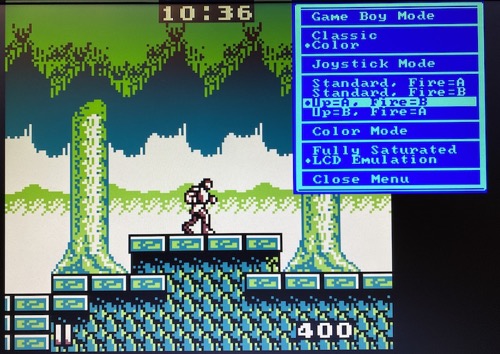
The screenshot shows the classic V0.8 options menu; its options live on in the V1.0 on-screen-menu.
Like all settings of the core, the joystick mode is saved to the SD card, so the core remembers your choice.