Chapter 25
Build it yourself
This chapter hands you the tools. By its end you can set a clone up, place the ROM, build the page, run the suite, run the original headless from a run description of your own and read a routine, and you will know what a change must keep and what to run after it. Read it at a terminal: each step has its command and what it prints.
What a clone needs
A clone, the repository copied with git (chapter 21), needs:
| What | For what |
|---|---|
| a POSIX shell and git: macOS, Linux, or Windows with WSL or Git Bash | the clone and the setup |
Python 3.11 as python3 |
the environment and every tool |
| the Kickstart 1.3 ROM image | the build and nearly every test |
| Node, Google Chrome and Firefox | the core's tests in WebAssembly, the page tests |
| macOS, with Apple clang | the native library the tests load; the project is tested on macOS alone |
Elsewhere the setup builds the page, and the tools that read and run the original need only the environment and the ROM; the suite, which loads the native library and drives two browsers, does not run there.
The setup
git clone https://github.com/sy2002/wof-wasm.git
cd wof-wasm
cp /path/to/your/kick.rom original/kick.rom
sh tools/setup.sh
The third line places the ROM image; the fourth runs the setup, tools/setup.sh, the one script that makes a clone ready to build and test.
It makes .venv, the environment, a Python of the project's own, and installs requirements.txt into it. For each of Node, Chrome and Firefox that is absent it prints a line beginning missing:, with where to get it or the variable that names another path, and the tests that will skip. Then it checks the ROM and builds the page, on macOS the native library too, in about half a minute on the owner's machine once the packages are downloaded. Running it again is harmless. Look at the comment, which says all it does, and at the lines that make and fill the environment:
The port's seven packages are pinned packages: each required at one exact version, written ==, so that every clone installs the same seven; what they pull in is not pinned and may differ. The compiler is among them: zig, packaged for Python as ziglang, carries the C compiler that makes the WebAssembly core. The book's packages are pinned whole, in a file of their own.
The commands here name .venv/bin/python, as the project's rules do, so that none reaches the system's Python. A fresh clone set up so built the page byte for byte the repository's and passed both phases of the suite, the first in a shorter form (chapter 24).
The ROM
The Kickstart ROM is the one file the repository cannot give you: still sold today, it is not ours to publish (chapter 2). The project uses one image:
The figures
| The ROM | |
|---|---|
| The image | Kickstart 1.3, revision 34.5, for the A500 and the A2000 |
| Its size | 262,144 bytes |
| MD5 | 82a21c1890cae844b3df741f2762d48d |
| SHA-1 | 891e9a547772fe0c6c19b610baf8bc4ea7fcb785 |
Cloanto's Amiga Forever sells it; a real Amiga 500 with Kickstart 1.3 gives it too. It goes as kick.rom into original/, which .gitignore keeps out of every commit.
The build takes two tables from it, the system font for the dialogs and the key conversion, the ROM's routine run for every key the shell can send; the headless original and the oracle run its floating point (chapters 5 and 6).
This is the ROM's check, by the size and the SHA-1: for the expected image it prints its identity, for any other one message saying what is wrong, what is needed and where to get it, and exits with 1.
The build makes the same check first and stops before it writes anything, for a page without the font and the key table would not be the game; the suite skips every test but four with the message (chapter 24). The setup with --book, shown below, builds the book's site before it looks for the ROM, and the site stands without one.
The build
The build is tools/build.py's making of the page, wof.html in dist/, from the sources, the disk's files and the ROM. The setup ran it once; run it again after any change:
.venv/bin/python tools/build.py
.venv/bin/python tools/build.py --native
.venv/bin/python tools/build.py --debug
The first builds the page, --native the tests' native library too, --debug the page with the core's debug information; each takes a few seconds on the owner's machine. The four steps:
| Step | Reads | Writes | Why |
|---|---|---|---|
| 1. the tables | the manifest, the program, the ROM | the tables as C, under gen/ in src/ |
no number of the game typed in (chapter 3) |
| 2. the files | 55 of the disk's files | one blob with a directory | a page opened from a file can load nothing beside it |
| 3. the core | the C, the tables among it | core.wasm in dist/ |
the game's logic as one WebAssembly module the page runs |
| 4. the page | the HTML template, the stylesheet, the modules, the core, the blob | wof.html in dist/ |
one file that runs from a double click |
Step 1 is tools/extract_tables.py; step 3 compiles chapter 22's freestanding C with zig. Step 4 joins seven of the shell's eight modules into one script, carries the eighth, the audio worklet, as text, and the core and the blob in base64, text that carries bytes. It stops if module syntax is left, the lines by which modules load each other, if an imported name is defined nowhere, or if the page outgrows the specification's limit.
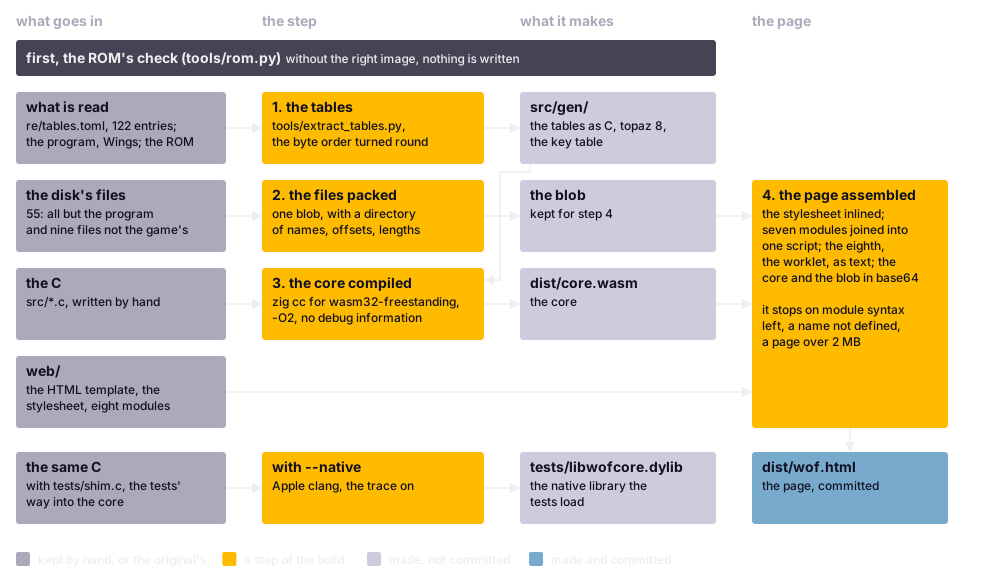
The build. The ROM's check is the gate: without the right image nothing is made. With --native the same C branches off into the tests' native library, which only a Mac builds.
The page is the build's first target; the second is chapter 5's native library, the same C with tests/shim.c, the tests' way into the core, compiled by Apple clang into libwofcore.dylib in tests/. It records what the core opened, played and drew; look at -DWOF_TRACE=1, which switches that on, and at -g0 ending the first list:
-g0 leaves out the debug information, which would more than triple the core; --debug keeps it, for stepping through the C in a browser's developer tools. That information once held every source's full path, a directory of the builder's machine, as a reading before the release found (chapter 9); since then -ffile-prefix-map writes the paths relative to the repository.
The compiler's version is pinned, the paths are mapped, and nothing of the machine or the clock goes into the page, so its bytes depend on the sources alone: two builds from the same sources are the same byte for byte. The page, about 1.1 MiB under the build's limit of 2 MB, is committed, and anyone can hold a build to it:
After a build, this prints nothing when your page is the committed one. Open your build of dist/wof.html to play it.
Verify
.venv/bin/python -m pytest tests/ --slow -m "not page" -n 8 --dist loadgroup
.venv/bin/python -m pytest tests/ --slow -m page
The first is the emulator phase, about an hour; the second, after it and never beside it, the page phase, about twenty minutes (chapter 24). -n 8 starts eight test processes, one for each physical core of the machine the suite was tuned on: use your core count, since more processes than cores only slow it down. --slow adds the longest of the loop tests, the differential tests that replay a mission against its recording. The suite builds the port itself first.
This opens a real Firefox window, the one check that sees a fault of the graphics processor; a covered window stops the page's clock.
With --junitxml FILE added to each phase, pytest writes its results as XML. REF.xml is such a file of your own earlier run, the reference run; the tool holds the two phases' files together to it as outcome sets and exits with 1 on any difference (chapter 24).
The headless original at a terminal
A run description is a small JSON file, every key optional; an unknown key stops the run with its name, so a misspelt one is never ignored. The book's own, book/runs/second-rank.json, takes a second rank's first mission: fire twice to the rank selection, the cursor key down to the second rank, fire to choose it, fire past the briefing and once more on the deck. Look at line 13, the key 77, cursor down, in decimal because JSON has no hexadecimal, and at the stop on line 21:
The keys: raw, segments of VBlanks with the letters U, D, L, R and F and raw key codes at a segment's first VBlank, neutral after the last; stop, ticks, passes or VBlanks since the start; entropy, the stream's seed, a list or one constant; vblanks_per_pass, 2; video_hz, on which only Delay depends; paula and music, the sound model and the real music player; files, laid over the disk; argc, the program's argument count; bytes, input bytes in place of the stick; format and version, the file's kind.
This runs it under the headless original and writes its dump, printing that it stopped at the 50th tick of its mission, after 645 VBlanks, in about a second, and the routines that read display memory, as chapter 6 found. --changes, --entropy-log and --schedule, options of run, add the change report, the log of the entropy stream and the schedule.
.venv/bin/python tools/headless.py show A.dump
.venv/bin/python tools/headless.py show A.dump --step 28
The first lists the dump's records, its steps, one a line: S where a mission's setup is done, T after a tick, P after a pass, each with its counts, input byte, the start of its hash and the number of memory ranges it changed. The second opens one, here the tick that took the press on the deck, checks the rebuilt state against the hash and names every range it changed.
Copy the description, change the key on line 13 or the wait before it, and run the copy with --out B.dump; diff names the first step at which the dumps differ, within a few VBlanks of your change (chapter 6), and every range differing there:
.venv/bin/python tools/m4_scripts.py --list
.venv/bin/python tools/m4_scripts.py trace landing
.venv/bin/python tools/m4_autopilot.py landing
The first prints the names of M4's mission scripts, as tools/m5_scripts.py, tools/m6_scripts.py and tools/m7_scripts.py print theirs; the second flies the landing, printing the player's state tick by tick. The third flies the landing's autopilot and prints a script, which then flies the original on its own (chapter 8). A thousand ticks of flight take about six seconds (chapter 6).
For the developer
From Python, headless.Headless(description) makes a run, run(until='tick') runs it to the next tick, and o is its oracle for reading memory (re/notes/headless.md, "Using it").
Reading a routine
Each prints the control-flow skeleton of the routine that reads a saved game, by name or by address as the tool takes it; --all prints it whole. Look at the four calls through the far-call table, each resolved to its routine, and, from the label at line 12, the path taken when the file does not open:
It keeps the listing's conventions, whose header chapter 4 read: kind, far-call slot, comment and callers, and here the frame, the bytes the locals take; an operand through the small-data base is followed by its name. Code no branch or call leads to, found by sweeping the gaps, is marked found by gap sweep. Never load the listing whole, 1.6 MB and 32,000 lines: a skeleton or a search lands on the routine.
A name is one line in re/names.txt: the address in hexadecimal, the name and, after a semicolon, a comment. Then:
The first makes the listing and the inventory again, in under two seconds; the second shows which files the name reached. Never edit the listing by hand: the next run would overwrite the edit. Both files are committed and held to this regeneration by tests/test_generated.py, so a diff shows exactly what a name changed.
The routine inventory's status column is the one kept by hand: where the port stands with a routine, carried over at every regeneration. The inventory's strings column holds commas, so count the statuses with a CSV reader, never with cut:
.venv/bin/python -c "import csv, collections; print(collections.Counter(r['status'] for r in csv.DictReader(open('re/functions.csv'))))"
It prints the counts, which chapter 4's table explains:
| Status | Routines | In short |
|---|---|---|
verified |
167 | held by a test of its own |
ported |
155 | held by the comparisons of whole runs |
partial |
1 | ported as far as the scripts run it, the rest marked as stand-ins or, where the reading was sure, ported from it (chapter 10) |
replace |
47 | done the port's own way |
drop |
36 | not needed |
todo |
210 | no status set |
.venv/bin/python tools/oracle.py
.venv/bin/python tools/reach_observe.py --blocks --setups --json REACH.json
.venv/bin/python tools/reach_observe.py --cold REACH.json
The first, the oracle's self-test, runs the game's unpacker on all ten packed files against the decoder in Python and prints ORACLE SELF-TEST PASSED. The second makes chapter 8's reach map, a long run of every script with every basic block, a stretch of instructions between two branches, recorded; --m5, --m6 and --m7 add the later milestones' scripts, --m7-only runs M7's alone. The third lists every cold region of a ported routine with its stand-in's marker, and fails on one without.
| Task | Tools | Told in |
|---|---|---|
| read | tools/disasm.py, tools/skel.py, tools/m68kdis.py for an address range |
4 |
| run | tools/headless.py, tools/oracle.py, each milestone's scripts and autopilot |
5, 6, 8 |
| observe | tools/reach_observe.py, tools/pass_observe.py |
7, 8 |
| decode | tools/map_decode.py, tools/ppkc.py, tools/rpck.py, tools/song_decode.py, tools/savegame.py |
5, 12, 13, 17, 18 |
| check | tools/rom.py, tools/mdcheck.py, tools/junit_compare.py |
21, 24 |
Fixing a bug
Every routine of the port went through the same six steps, the working method the specification sets out; a fix follows them from the step where the fault lies.
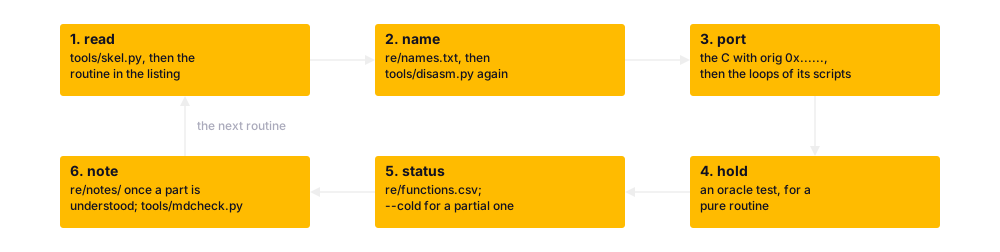
The working method's six steps, each with its instrument.
| Step | What you do | What to run after it |
|---|---|---|
| 1. read | the skeleton, then the routine in the listing | nothing yet |
| 2. name | the routine and its variables in re/names.txt |
tools/disasm.py, then git diff |
| 3. port | the C, with orig and the address in a comment |
the loops of the scripts that reach it |
| 4. hold | for a pure routine, an oracle test on random inputs | its oracle test file |
| 5. status | the routine's status | tools/reach_observe.py with --cold, for partial |
| 6. note | what was learnt, in re/notes/ |
tools/mdcheck.py on the note |
Step 4's hold is the oracle's call, by which a test runs the original's routine on inputs it chooses (chapter 5); look at o.L(...), a long or a pointer pushed onto the stack:
# tools/oracle.py, lines 6-11
    from oracle import Oracle
    o = Oracle()
    src = o.alloc_bytes(packed)             # copy data into emulated RAM
    dst = o.alloc(unpacked_size)
    o.call(0x01FEE0, o.L(src), o.L(len(packed)), o.L(dst), o.L(unpacked_size))
    result = o.read(dst, unpacked_size)
o.W(...) pushes a 16-bit int, right to left as the compiler does; the result comes back in D0. Oracle(a4=0x02AFFE) serves a routine that reaches the game's variables; call takes regs= for a hand-written routine's registers, ccr=True for the condition codes.
A change keeps the rules the specification and CLAUDE.md set, two of them chapter 22's, each for its reason:
- Port from the listing, as chapter 22 says: the comparison is with the original's code.
- Give every value its width,
int16_tand the like: the original's int has 16 bits. - Read every table through the manifest, one entry each, as below: a value typed in could be wrong.
- Leave
original/untouched: every claim is checked against its bytes. - Mark a region no script reaches as a stand-in, with the milestone that owes it and its address, so that a run reaching it fails loudly (chapter 8).
- Keep the line count when you change only comments in a file with coroutines: a resume point is a line number. A comment changed under
web/changes the page too (chapter 23).
Here is the manifest's first entry; look at its kind, names4, four-character shape names, the address in the fixed load layout and the count:
# re/tables.toml, lines 26-34
# The nine lists lie back to back at 0x023BC0-0x024628, each ended by a zero long.  The
# slot order is what game code relies on, so the port builds its pointer tables from these
# and never from the containers (re/notes/shapes.md).

[[table]]
name = "battleship_names"
kind = "names4"
addr = 0x023BC0
count = 25
Say the change is to the drop, which lets a weapon go (chapter 15). Its oracle test runs first, then the loops of a script that drops:
.venv/bin/python -m pytest tests/test_oracle_m5.py -k drop
.venv/bin/python -m pytest tests/test_weapons.py -k bomb_a
.venv/bin/python book/tools/build.py --check
The second runs the four loop tests of the script bomb_a, the closed loop at three pass rates and the open loop; -k picks tests by name. The third, the book's check, remakes the book's listings and holds them to the committed ones:
| If the change touched | Run | How long |
|---|---|---|
| a routine | its oracle test file, then the loops of the scripts that reach it | a recording first, under a minute a mission (chapter 6) |
| a stand-in | --cold over a fresh reach map |
long: every script is flown |
src/ or web/ |
the build, then whether the page changed, by git status |
a few seconds |
| the sources, the tools, the tests or the listing | the book's check | about a quarter of a minute |
| anything | both phases | about an hour and twenty minutes |
Chapter 9's fault shows what a failure looks like. The port assumed a register's upper word 0 at a routine's entry, while the original handed a long on. The oracle tests now draw it at random, so such a port fails on a random state, with the input and both results. The closed loop names the moment: a loop test fails with each failing check, the number of passes it failed in and its first three cases, each named by its pass, a state's difference as the field's name with the port's value and the original's; in chapter 9, the engine's smoke a pixel off. The open loop then tells whether that pass goes wrong on its own, run from the original's state.
Extending the port
The design left two places open, both outside the game's logic:
- The display list. Every shape drawn in a pass is also listed, with its name, place and layer, for a renderer that could one day draw the game anew; the page ignores it (chapter 22).
- The shell's options. They went with M10, which the owner dropped when the game was judged done: among them chosen keys, a gamepad's mapping, scaling, the video standard as a menu and a mute for the title's music (chapter 10).
The rule for both: nothing of the game's logic changes. A shell option goes in web/, where no test compares it with the original. A rule of the port's own that touches what the game reads goes in a file of its own in the core, as src/portkeys.c and src/assist.c do, held by its tests, the page tests and the closed loop with it off.
With an AI assistant, CLAUDE.md holds the rules a session reads first and ends by: the names, the notes, the statuses, the tests green, the specification corrected. CONTROLLER.md holds the arrangement with a controller (chapter 10) and the pitfalls that cost time, among them:
- A computer left alone sleeps, which stops every session and run of the suite; a test that ran across a sleep counts for nothing.
- Load from outside has failed page tests: run them again on a quieter machine before believing it.
- A run of the suite piped into
tailends withtail's exit code: read the line with the counts.
The book's own build
The first installs the book's packages and builds this site; the second serves it at http://127.0.0.1:8000/wof-wasm/. Serving the book needs no ROM; remaking its generated files does: book/tools/build.py remakes them, most from the built repository and the ROM, and with --check holds the committed ones to them.
Beyond this chapter
The appendices follow, the glossary, the keys, the routine inventory and the licence, with the book's two other pages, the shape browser and the map viewer.
A real Amiga could settle three things the port takes from documentation or the owner's ear: the VBlanks a busy scene's pass takes, filmed as the quiet one was (chapter 7); the music timer's low byte at power-up (chapter 18); and whether a new file goes to the head or the tail of its directory's chain (chapter 20). They are open.
Amiga to Web
The setup, the ROM's check and the build make the same page on every machine, and on a Mac the tests' library; the tools read and run the original at a terminal; and a change keeps the rules and runs the instruments that hold it. What remains is an idea.
Take Wings of Fury out of this repository and much of it stands: the instruments that read an Amiga program and run it headless, the runtime that gives one program an Amiga without the Amiga, the shell, the tests, and the method; about two fifths of the work went into it (chapter 10). Each game's own is the rest: its names, notes and manifest, every routine of its logic, its scripts, its owner's decisions.
The method reaches games built as this one is, compiled C or disciplined assembly on top of AmigaOS, files through AmigaDOS, memory through exec: by our reckoning a real class, much of Broderbund's and Cinemaware's catalogue and many conversions from the PC and the ST. It does not reach games of hand-written assembly with a loader of their own, self-modifying code, hardware sprites or copper tricks: there the stubs serve nothing, and the oracle would have to become an emulator of the chips.
Hence the owner's idea, not started: a template, a repository made to be cloned for another game, "Amiga to Web". You would name it after the game, place the ROM and the disk image, open the sessions the handbook names and tell them to start. Starting cannot be a button: the owner is needed for the decisions, the look and the listen, and the budget. A controller told to start could do the first three milestones alone, the build, the first picture and the headless original reaching a mission, and come back with the plan and the questions. Its first task would be to part this repository's generic half from the game's, this repository staying the worked example and this book its manual. The owner plans it for after the release and this book, and a template counts as proven only when a second game has gone through it.
Further reading
The files named here are in the repository, github.com/sy2002/wof-wasm.
README.md, "Build and verify";tools/setup.sh,tools/build.pyandtools/rom.py.SPEC.md, sections 4, "Tools"; 5, "Build"; 7.4, "Working method".re/notes/headless.md, "Using it";CLAUDE.md, the working rules.re/notes/amiga-to-web.md, the idea of a template.
Outside the repository: pip's "Repeatable Installs", on pinning; Reproducible Builds, the practice behind a page built the same everywhere; MkDocs, the book's engine.